Offline-first · No account · Your scripts stay on your phone

The teleprompter that follows your voice.
Look confident, every take.

OwlPrompter is a teleprompter for iPhone and Android that reads at your rhythm. Speak and the script follows. Look away and it waits. Record with captions burned in, or go live — all of it on your device.

Free to use without an account. Pro starts with a 7-day free trial.

The OwlPrompter script library, with folders and saved scripts

Stop memorising. Just say it.

A teleprompter should disappear into the take. OwlPrompter tracks your voice and your eyes, so the words are always where you are — and everything it does happens on your phone.

1

Record straight from the app

Film yourself while you read, with the script sitting right next to the lens. Filters, virtual backgrounds and captions are baked into the file — what you see in the preview is what you get in the export.

2

Go live, or read for someone else

Stream straight to TikTok, Facebook, YouTube or any RTMP server in a tap. Or leave the prompter running on screen while you present, record elsewhere, or shoot on a rig.

Everything you need

A teleprompter built around how people actually talk

Voice scroll

The script follows your voice, not a stopwatch

Most prompters scroll at a speed you guess in advance, so you spend the take chasing the text. OwlPrompter listens instead.

  • Speech-to-script alignment runs on your device — no network needed
  • Pause to think and the scroll waits; pick up and it comes with you
  • Adaptive pacing gives dense lines more time than short ones
  • Tap any word to jump straight there
The script open in the editor at reading size

Eye-contact mode

Look away and the scroll holds

The moment you glance at your notes, a normal prompter keeps going and you lose your place. This one notices and stops.

  • Holds the line the second your eyes leave the lens
  • Resumes when you look back — no button, no remote
  • Runs entirely on the device camera; nothing is recorded or uploaded
The camera view with the amber reading line sitting level with the eyes

Recording

What you see in the preview is the video you get

Filters, background blur and captions are rendered into the recording itself, so there is no surprise when you open the file.

  • Virtual and blurred backgrounds, applied live
  • Captions burned into the picture, plus a matching .srt file with every take
  • [Bracketed] stage cues show faintly on screen and never appear in the video
Filters previewed live on the camera and composited into the recording

Live streaming

Go live with your script on screen

Paste a stream key once and broadcast with the prompter running — the audience sees the camera, you see the words.

  • Any RTMP or RTMPS destination: TikTok, Facebook, YouTube, custom servers
  • Reconnects on its own when the network drops mid-broadcast
  • Keeps streaming when you leave the app to check something
The Go Live sheet listing YouTube, TikTok, Instagram, Facebook and a custom RTMP URL

Delivery Score

A report card after every take

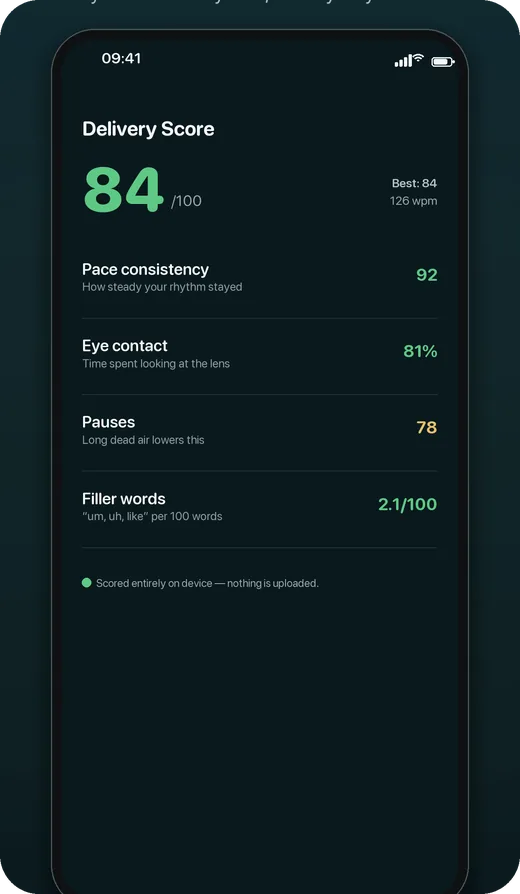
You get eye-contact percentage, pace consistency, where you paused and which filler words crept in — so the second take is better than the first.

  • Scored on your device; no audio, video or text is uploaded
  • Free on every plan, not held back for Pro
  • Pro adds one-tap removal of “um”, “so” and dead air
A Delivery Score of 84 out of 100, broken into pace, eye contact, pauses and filler words

Scripts

Your scripts stay on your phone

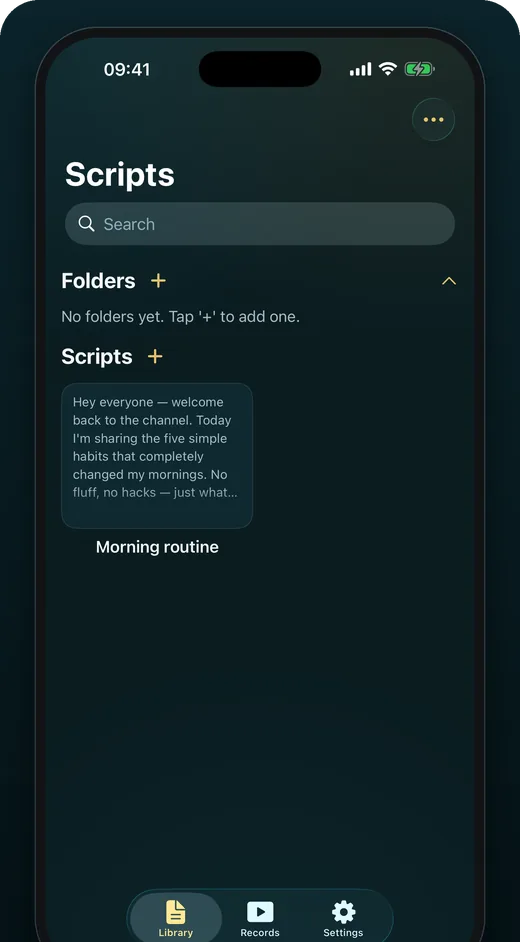
There is no account to create, no sync to switch off and no server of ours holding your words. Import what you have and it stays where you put it.

  • PDF, DOCX, TXT and RTF import that gets every character right
  • Folders and search across your library
  • Nothing leaves the device unless you export it yourself
The script library, with folders, search and saved scripts

Built in, not bolted on

Designed so reading is the easy part

A prompter is only as good as the moment you can read it under pressure. Type size, contrast and the interface language are all first-class settings, in 11 languages.

Type that scales Oversized text that rewraps cleanly at any size.
11 languages The whole interface, not just the marketing page.
Calm under pressure Controls stay reachable while the camera is rolling.
Works offline Every feature above runs with the network off.

No account. No cloud. No tracking.

Voice tracking, eye-contact detection and Delivery Score all run on the device. Your scripts and recordings are stored on your phone — we have no way to read them.

Read the privacy policy →

Simple pricing

Free to use. Pro when you need it.

One Pro tier, three ways to pay. Every option unlocks exactly the same features — and both subscriptions start with a 7-day free trial.

Free

$0

  • Speed and timed scrolling, at your own words-per-minute
  • Up to 3 scripts
  • Video recording with filters
  • PDF, DOCX, TXT and RTF import
  • Delivery Score after every take
  • Interface in 11 languages

Frequently asked questions

Is OwlPrompter free?

Yes. The free tier gives you speed and timed scrolling, video recording with filters, document import, Delivery Score and up to three scripts — with no watermark on your recordings. Pro adds voice scroll, eye-contact mode, unlimited scripts, captions, live streaming and the on-device AI tools.

How does the 7-day free trial work?

Monthly and yearly plans start with a 7-day free trial. You are not charged until the trial ends, and cancelling before then costs nothing. The trial is handled by the App Store or Google Play, so you cancel it the same way you cancel anything else there.

Which devices does it run on?

iPhone and iPad on iOS 17 or later, and Android phones and tablets on Android 10 or later. There is no Mac or web version today.

Does it really work offline?

Yes, and this is the point of the app rather than a bonus. Prompting, recording, voice tracking, eye-contact mode and Delivery Score all run on your device. Live streaming needs a connection for obvious reasons; everything else does not.

Do you have my scripts?

No. There is no account and no sync. Your scripts and recordings are stored on your phone, and we have no way to read them.

See all questions →

Your next take can be your first take.

Free on the App Store and Google Play. Pro starts with 7 days on us.